Tw360
Early Warning
How ThreatWatch360 Handles Early Warning?

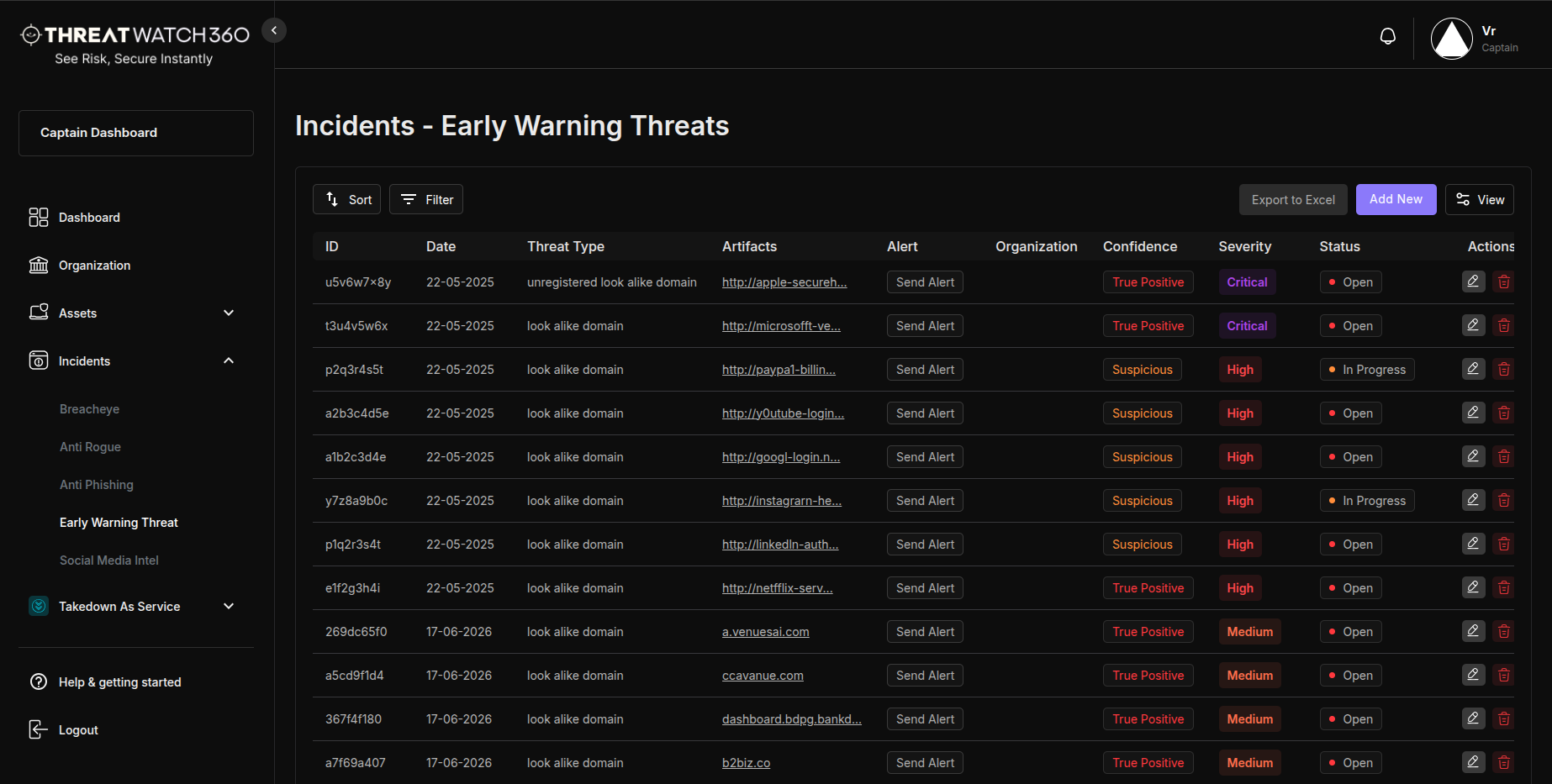
ThreatWatch360 monitors domain registrations, DNS anomalies, and impersonation infrastructure setup globally. We detect suspicious activity related to your brand — before attackers launch phishing campaigns or fraud attempts.


Our system continuously monitors:


  • Lookalike Domain Registrations
  • Suspicious DNS Records & MX Setup
  • WHOIS & Certificate Anomalies
  • Impersonation Infrastructure Patterns
Key Features
Everything in Early Warning
Talk to a Security Expert
Feature 01
Suspicious Domain Detection
Detects newly registered domains that resemble your brand name or trademarks.
Feature 02
Typo & Homograph Attack Monitoring
Monitors for visually deceptive domains using homoglyphs (e.g., “threatwatch360.com” vs. “threatwɑtch360.com”).
Feature 03
MX Record & SSL Surveillance
Flags domains that configure email services (MX) or TLS certificates similar to your brand — signs of phishing readiness.
Feature 04
Predictive Threat Modeling
Uses behavioral analytics to predict domain abuse likelihood before launch.
Feature 05
Custom Domain Watchlists
Track specific terms, keywords, or executive names being used in domain registrations.
Feature 06
Early Takedown Escalation
Preemptively initiates takedown preparation for high-risk lookalike domains before active phishing begins.
Why Choose
Why Choose ThreatWatch360 for Early Warning?
  • Prevent Attacks Before Launch: Disrupt phishing campaigns in their setup stage.
  • Gain Tactical Advantage:Monitor attacker movements in real-time.
  • Empower Your SOC:Feed high-confidence early IOCs into your defensive stack.
Prevent attacks before launch
New registrationsLookalikesHomographs
Gain tactical advantage
MX & SSL signalsWHOIS anomaliesInfra patterns
Empower your SOC
Early IOCs
Fed to your stackHigh confidence, before the campaign
Step 01
Watch
Monitor new domain registrations, typos, and homograph lookalikes.
Step 02
Profile
Check MX records, SSL issuance, and WHOIS for signs of weaponisation.
Step 03
Predict
Model which registrations are most likely to become live attacks.
Step 04
Escalate
Alert your team and open takedowns before the campaign launches.
How It Works
How ThreatWatch360 Handles Early Warning

ThreatWatch360 monitors domain registrations, DNS anomalies, and impersonation infrastructure globally, profiles each candidate against MX, SSL, and WHOIS signals, and models which ones are most likely to go live. Suspicious activity around your brand reaches you before attackers launch the phishing campaign, not after.

Get Started
Get Started With Early Warning

Take Control Before the Attack Starts!
Identify high-risk domain registrations and phishing setups before they’re weaponized.


  • Gain Predictive Intelligence for brand threats.
  • Enable Proactive Takedowns with zero-hour alerts.
  • Protect Your Brand Reputation at the root.

Frequently Asked Questions

Quick Answers to Your Questions
What does ThreatWatch360’s Early Warning solution do?
It continuously scans millions of websites to detect unauthorized use of your brand, including phishing sites, lookalike domains, and fake online stores, and takes immediate action to block or remove malicious content.
How does ThreatWatch360 detect phishing websites?
The ThreatWatch360 engine uses advanced algorithms to analyze text, images, and website layouts, identifying phishing patterns that mimic your official brand.
Can ThreatWatch360 prevent domain spoofing and Typosquatting?
Yes, it monitors and flags domains with slight misspellings or substitutions, as well as newly registered domains resembling your brand, providing instant alerts.
How does ThreatWatch360 handle unauthorized use of brand logos and assets?
ThreatWatch360 uses AI-driven analysis to detect unauthorized use of logos, trademarks, and visual assets on deceptive sites.
What happens after a phishing threat is detected?
When a threat is detected, the customer is immediately alerted. You simply need to select the "Takedown" button in your dashboard. Once initiated, our backend team sends an official notice to the respective body (e.g., hosting provider, registrar, or platform). The entire takedown process can be tracked in real-time through the Takedown Dashboard, providing complete visibility and updates on the resolution status.
Does ThreatWatch360 provide ongoing monitoring?
Yes, it continuously monitors for new threats, ensuring proactive protection against phishing or cyber fraud attacks.

Contact Us

Get In Touch!

  • Tower, 10th floor, 102 C Wing Mittal, 210, Nariman Point, Mumbai, Maharashtra 400021
  • contact@threatwatch360.com

ThreatWatch360 Brochure

Brand Protection
A Digital Risk Protection Platform
Cyber Threat Intelligence Solution